Posts

Scan-IT to Office 3.17.0 Makes Developers Happy

Image
Updates in Scan-IT to Office 3.17.0: What’s New and Improved?  We’ve added new features 🆕 Developer Mode:  JavaScript action endpoints for customized Excel logic  🔄 Backup/Restore:  Save and import your JavaScript action endpoints and settings  How to use Developer Mode JavaScript action endpoints under developer tools section  are used to customize the data acquisition logic when scanning data into Excel worksheets. With the help of JavaScript and the  Office-JS API  you are able to:  Insert data into specific worksheet fields, Check if a data entry is eligible for insertion,  Perform arbitrary lookups and validations Send feedback to the device, etc.  👇Our demo endpoints show examples of how inserts can be manipulated.  👇Here is how you can download sample Excel sheets: Note: The JavaScript action is triggered only if a matching action name (see "Supported Actions") is sent from the data entry form in the Scan-IT to Off...

Scan-IT to Office Meets CASA Requirements!

Image
Good News!  Our #ScannerApp Scan-IT to Office has successfully completed a Cloud Application Security Assessment (CASA), conducted by PwC, validating that it meets all CASA Tier 2 security standards. Your Benefits Achieving CASA verification brings several benefits to our users: Enhanced Security : Our commitment to high security standards ensures your data is protected against threats. Compliance Assurance : Meeting CASA requirements demonstrates our adherence to industry best practices and regulatory standards. Increased Trust : Independent verification by PwC boosts confidence in our app's reliability and security. Streamlined Operations : Secure and compliant solutions reduce risk and enhance operational efficiency, giving you peace of mind. Empower your workflow with the confidence that Scan-IT to Office is securely verified and ready to meet your needs.

Batch Barcode and QR Scanning into Excel with Scan-IT to Office, Lightning-Fast!

Image
🚀 Get ready to revolutionize your barcode scanning game with an upcoming feature that's set to redefine efficiency in our #ScannerApp, Scan-IT to Office! 📲✨ 🌟 Curious about the buzz? Take a sneak peek into the future of barcode and QR code scanning by checking out our latest YouTube short. Brace yourselves for a game-changing experience as we introduce lightning-speed batch scanning! Scan-IT to Office isn't just your average mobile scanner app — it's a dynamic data acquisition app that seamlessly transfers real-time mobile-collected data to target systems. And guess what? We're about to kick it up a notch with the introduction of SUPERBATCH — the ultra-fast batch scanner mode (better terms are welcome, please comment). Say goodbye to the hassle of scanning one by one; with SUPERBATCH, effortlessly scan hundreds of codes directly into Microsoft Excel (or any other supported target system)! Our teaser video showcases the magic of SUPERBATCH in action. Picture scanned b...

Enhance Document Security with TFORMer's New PDF Encryption Support

Image
We are excited to announce the latest update to TFORMer, our versatile output solution for labeling and reporting. With the release of version 8.6, we are introducing a powerful new feature that enhances the security of your documents - PDF Encryption. TFORMer V8.6 PDF Encryption: Elevating Document Security In response to the growing digital transformation needs for robust document security, TFORMer Designer v8.6 now empowers users with the ability to generate encrypted PDF output files . This significant enhancement ensures that your sensitive information remains confidential and protected. Fine-Tune Encryption Options The update includes corresponding input dialogs, document properties, SDK options, and configuration settings, allowing users to fine-tune encryption options according to their specific requirements. Whether it's adjusting fine-grained encryption parameters or setting up passphrase protection, TFORMer gives you full control over the security features of generated P...

Discover the GS1 Barcode System - Part 1: Learn the Basics

Image
GS1 Barcode System Basics - Part 1 Hello to all readers! In this blog post, we'll dive into the fundamentals of the GS1 barcode system, unraveling the essential basics that make it a cornerstone in various industries. Types of GS1 Barcodes This post series provides a fundamental overview of the used barcode- and 2D code symbologies and explains terms like AI, data identifier, application identifier, or FNC1. The GS1 system employs various barcode types to encode information, tailored to specific applications. These include  EAN ,  UPC ,  GS1-128 ,  GS1 DataBar , ITF-14, and the 2D codes  GS1 DataMatrix  and  GS1 QR Code . The choice of barcode type depends on the application area: EAN and UPC Codes EAN-13 Barcode UPC-A Barcode EAN codes are prevalent in Europe, while UPC codes are commonly found in North America. These codes, prominently used in retail product labeling, help streamline the checkout process at supermarkets. They contain a unique...

Using KIA EV6's V2L Function to Safeguard Data Center During Power Outages

Image
Data Center Power Outage Resilience, a Real-World Scenario (be warned, this post is off-topic) Longer-lasting grid power outages can pose significant challenges to data centers. In this blog post, we share a real-world scenario where the V2L (Vehicle-to-Load) function of a KIA EV6 became a lifeline for our data center. Specifically, we'll delve into the steps taken to utilize the KIA EV6 to power the UPS (Uninterruptible Power Supply) of our data center during an outage caused by a planned power grid shutdown. The Challenge In this particular instance, our power grid operator scheduled a power shutdown in our area to perform major replacement and upgrade work, leaving the data center without its usual power supply for about two hours. To overcome this challenge, our team decided to leverage a KIA EV6, equipped with a 50-meter extension cable, to provide a continuous power source to the UPS, ensuring uninterrupted service to our IT infrastructure. 👉 Important: Our team tested the c...

Scan-IT to Office: Exciting ScannerApp Updates

Image
New Beta Unveils Powerful Enhancements We're thrilled to invite you to test the beta version of the ScannerApp   Scan-IT to Office , offering a sneak peek into the upcoming release's features. Scan-IT to Office  is set to transform mobile barcode/QR code scanning and remote data acquisition tasks, ensuring seamless synchronization with target applications such as Microsoft Office, Google Sheets, on-premise databases, and various Windows/macOS desktop applications. Here's a glimpse of the key highlights in our latest beta release: Configurable Default Scanner for QR Codes & Barcodes Now, you have the flexibility to choose your app-wide default scanner for QR codes and barcodes, tailoring your experience based on your specific needs: Simple Scanner Scans solitary QR and barcodes, maintaining compatibility with previous versions. Selective Scanner with Live Preview Advanced camera scanner capable of decoding multiple codes simultaneously, providing a live preview of code t...

Using Scan-IT to Office as (Barcode) Scanner App for Google Sheets

Image
A QR/Barcode Scanner App Made for Google Sheets This video demonstrates how to use the scanner app  Scan-IT to Office  as a fully equipped wireless 2D barcode/NFC/text scanner with automatic Google Sheet and Google Drive™️ synchronization. Scan-IT to Office  streamlines mobile scanning and data entry for Google Sheets. It transfers any combination of barcodes, QR/2D codes, NFC tags, image-to-text (OCR), or manual input instantly to your worksheet. Connect your smartphone to the Google Sheet worksheet with just a few taps and enter or scan data using the app. The data collected with the app is synchronized in real-time with your target worksheet.  Advantages ✅ Use your smartphone as a fully featured wireless 2D barcode/NFC/text scanner with automatic Google Sheet synchronization  ✅ Scan barcodes, QR/2D codes and NFC tags directly into your worksheets without wasting time  ✅ Recognize text in images (OCR) and avoid typing  ✅ Create custom input forms fo...

Your TEC-IT License, Serial or Activation Key Isn't Working?

Image
Experiencing trouble licensing TEC-IT software after reinstalling or migrating the product? Read on! Here is a step-by-step guide to help you solve this issue on your own. Self-Service License Key Management  This post shows you how to use the self-service license key/activation key management online service for the following TEC-IT software products: Barcode Studio ( https://tec-it.com/bcs ) TFORMer ( https://tec-it.com/tfd ) TWedge ( https://tec-it.com/twedge ) TBarCode Office ( https://tec-it.com/tbo ) Visit https://license.tec-it.com to recover, reactivate, reset or migrate activation keys for the above-mentioned TEC-IT software. This is especially helpful when moving licenses between computers, if you need to reactivate a product after reinstallation, or if the system ID of your computer changed after performing a factory reset or installing a new hard disk. The process is simple and usually completed within minutes, help by TEC-IT staff is not required . How to Use Enter t...

Scan-IT to Office - NEW VERSION

Image
The Smart Data Acquisition Solution Scan-IT to Office is a capable alternative to conventional mobile data collection devices and wireless barcode scanners. The app transmits mobile collected data in real-time to target applications - completely independent of their location. The collected data is immediately available for further processing. Scan-IT to Office  combines simple configuration with flexibility and covers an entire range of functions: from plain barcode scanning up to tracking and inventory applications with database connectivity . What's New? This update offers the following features: Inventory and Asset Management Added ready-to-use forms for inventory/stocktaking with automated quantity management (Microsoft SQL Server, Microsoft Excel, Google Sheets). Check-In/Check-Out Added ready-to-use forms for attendee tracking and check-in/check-out (Microsoft SQL Server, Microsoft Excel, Google Sheets). Bi-Directional Communication Added the capability to send data from a...

How to Create Swiss QR Codes for QR-Bills: Video

Image
https://tec-it.com - TEC-IT published a new video demonstrating how users can create Swiss QR Codes online , without registration and free of charge. The Swiss QR Codes are created according to the standard of the Swiss financial industry for machine-readable QR bills.  QR-BILL OVERVIEW  A QR-bill contains the following information:  a receipt (the counterpart to the payment slips used in the past)  and a payment part with information about the amount to be paid, sender and recipient of the payment, as well as information on the reason for the payment.  In a QR-bill (French QR-facture, Italian QR-fattura, English QR-bill, German QR-Rechnung), the information of the payment part is specified as text and as a machine-readable Swiss QR code. A Swiss QR code differs visually from usual QR codes by a Swiss cross logo (dimensions 7 mm x 7 mm) in the center.  More information is available in the YouTube video Swiss QR Code Generator für QR-Rechnungen : Use the on...

End-To-End Encryption and OCR for Scan-IT to Office

Image
With the long-awaited version 4,  Scan-IT to Office  is ready for the next level of data acquisition: This mobile data collection and barcode scanning solution now supports  end-to-end encryption  and  text recognition (OCR) . Maximum Privacy and Security End-to-end encryption ensures that data captured remotely is sent and received securely. Only you (or persons you entitle by pairing) will be able to view and access data collected with your devices. Even TEC-IT as developer of the system has no possibility to decrypt your information. End-to-End encryption is enabled by default, no additional configuration is required. The app indicates an active end-to-end encryption by displaying a connection state icon with an additional lock symbol. OCR Support Reduces Typing The text field form now supports text recognition (OCR) via camera. The integrated text scanner converts camera images to text within seconds and makes typewriting obsolete. Latin-based text ...

New Beta: Office Add-In with Swiss QR Code

Image
TEC-IT's comprehensive  barcode add-in for easy bar-code creation in Microsoft® Word and Excel®  reaches the next level. The new BETA for version 11 of this helpful tool introduces support for  Swiss QR-Code  2.0 and other barcode technologies like DotCode or Royal Mail postal barcodes. Additional performance and user interface improvements complete the new release. What's New? Swiss QR Code 2.0 V11 supports Swiss QR Code 2.0 based on Swiss Payment Standards 2019. New 2D Barcodes DotCode Rev. 4.0, Han Xin Code, Data Matrix DRME, PPN Code and NTIN Code New Postal Codes Royal Mail Mailmark® 2D, Royal Mail 4-State Mailmark™ and USPS Intelligent Mail Package Simplified User Interface The already intuitive user interface has been further improved. The advanced barcode settings are now accessible more easily. Improved Stability The serial letter function has been revised to improve performance. Upward Compatibility Barcodes created as EMF image with the previous ...

Online Label Printing Portal Enhancements

Image
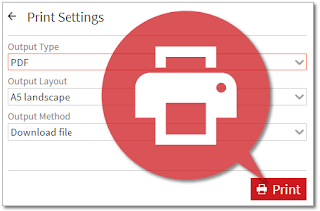
TEC-IT's  Online Label Generator  has been recently updated. This online label printing solution allows you to  generate industry standard labels with your own data  in seconds. The focus of this update was on improving the user interface: New Upload Form In addition to selecting the desired data file, the new form allows you to adjust the upload settings. Direct Printing You can now print the labels directly from within the settings view. Just try the Online Label Generator for free ! In case of questions, please  contact us .

End-To-End Encryption for Scan-IT to Office - BETA

Image
We increase  privacy and security  for our mobile data collection and barcode scanning solution  Scan-IT to Office . Thus, we will soon switch to a system utilizing  end-to-end encryption . End-to-end encryption ensures that data collected or scanned remotely is transmitted with maximum privacy. Only you (or persons you entitle by pairing) will be able to view and access data collected with your devices. Even TEC-IT as developer of the system has no possibility to intercept your information. In order to prepare for a smooth transition, we invite users to  install the new beta version of the Scan-IT to Office app for Android :  Test Scan-IT to Office V4 beta . Using this beta, you  benefit immediately from an enhanced user-interface and stability improvements . Please note that end-to-end encryption will not be activated until all components of the Scan-IT to Office system are updated, we will do this within the next few weeks. We invite you t...

TEC-IT is There For You # COVID-19

Image
Important information for our visitors and customers! Due to the current situation, we would like to inform you that  the entire TEC-IT team is available for you . Even if our employees are now working at home,  we can be contacted as usual  by phone ([+43] (0) 7252/72 720) or email ( support@tec-it.com ,  sales@tec-it.com ). This situation is also new for us, so we ask you to be lenient about slightly increased response times or other minor issues. Since we know that many of our existing customers now need licenses to use TEC-IT software on private computers,  we issue temporary licenses for free  if necessary. These temporary licenses are available for existing customers and are valid until May 31, 2020. Re-licensing or uninstalling of the original license is not necessary, the simultaneous use of private and corporate licenses is of course possible. Just contact us via the  web-form . We hope this message is helpful and thank you for your un...

Online Barcode Maker with Additional Features

Image
TEC-IT’s popular  Online Barcode Generator  was recently updated with a new sequence generator and code page selection. These are the improvements in detail: Sequence Generator This feature allows you to fill barcode data with an automatically generated sequence in order to download multiple barcodes at once. This function is limited to a maximum of 10 barcodes for unregistered users. If you need support for larger sequences, just contact  sales@tec-it.com . Arbitrary Character Sets Users are now able to select a code page to create barcodes with non-Latin characters. Just go to  Settings - Advanced  and select the desired code page. An example: By default Data Matrix codes are generated using the Latin-1 code page (ISO/IEC 8859-1). By selecting the UTF-8 code page you are able to create Data Matrix codes with Chinese, Japanese or Russian characters as well. Further Enhancements Minor improvements and bug fixes. Try the free  Online Barcode Generato...

Improved Online Label Printing With New Templates

Image
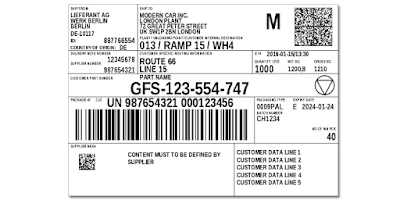
TEC-IT's  Online Label Generator  has been recently updated. This online label printing solution allows you to  generate industry standard labels with your own data  in seconds. The focus of this update was on improving compliance label templates and the usage of TFORMer V8: Updated Label Templates The General Motors (2018) templates have been updated. You will find now all GM templates in a separate group. New Label Templates The automotive templates VDA 4992 and VDA 4994 are now available. TFORMer V8.0.2 This online service now uses the latest  TFORMer  version. Higher Number of Copies The user can now set a maximum of 65 copies for each label. Further Enhancements Minor improvements and bug fixes. Just try the Online Label Generator for free ! In case of questions, please  contact us .

User Friendly Barcode Label Printing Software

Image
TFORMer , TEC-IT's professional  label printing software , provides powerful design and printing features combined with great usability. Using the long-awaited  Version 8.0 ,  TFORMer Designer  and  TFORMer SDK  you are now ready for the next level of labeling! What's New? Quick Format Support Formatting of numeric, data, time and text fields is simplified with the new output format feature. Real Data Label Design Label design with actual label data improves clarity and easy-of-use. New Layout Container Files TFZ file extensions for  Save As...  and  Open...  allow the user to edit label layout files with a simple double click. TFZ files are containers for layouts with embedded images and can be directly uploaded to the  Online Label Generator  ( https://label.tec-it.com ). Updated Industry Label Templates Common industry templates like VDA 4994 and GM 1724 were updated to match current standards. Enhanced Printing Ke...