Posts

Showing posts with the label Keyboard Wedge

End-To-End Encryption and OCR for Scan-IT to Office

Image
With the long-awaited version 4,  Scan-IT to Office  is ready for the next level of data acquisition: This mobile data collection and barcode scanning solution now supports  end-to-end encryption  and  text recognition (OCR) . Maximum Privacy and Security End-to-end encryption ensures that data captured remotely is sent and received securely. Only you (or persons you entitle by pairing) will be able to view and access data collected with your devices. Even TEC-IT as developer of the system has no possibility to decrypt your information. End-to-End encryption is enabled by default, no additional configuration is required. The app indicates an active end-to-end encryption by displaying a connection state icon with an additional lock symbol. OCR Support Reduces Typing The text field form now supports text recognition (OCR) via camera. The integrated text scanner converts camera images to text within seconds and makes typewriting obsolete. Latin-based text ...

NEW: Store Remotely Collected Data in Databases

Image
Scan-IT to Office , TEC-IT's popular product suite for simple and fast mobile data acquisition, has been extended by a new tool, the Smart Database Connector. This extension  stores remotely collected data in real time in databases , it's the ideal solution for building a  24/7 data collection system   which operates completely unattended. Smart Database Connector Data is captured as usual with the Scan-IT to Office App on your smartphone or tablet. The Smart Database Connector stores the collected data in any SQL database accessible via ODBC (e.g. Microsoft ™  Access ™ , SQL Server, SQL Express, Oracle ™ , etc.). This tool is installed on Microsoft ™  Windows desktop computers or servers and runs as system service in the background. Just Try It Out! Scan-IT to Office App The mobile app is available for  Android  and  iOS  in the respective stores. For volume licensing requirements, TEC-IT offers a special  bulk version ...

Data Collection Software "Nifty as Never Before"

Image
TWedge Redefines Flexibility  +TEC-IT   proudly introduces the smart data collection software   TWedge Version 3 . RELEASED as of May 22, 2014!! TWedge is more than just a keyboard wedge - this software tool makes automated data acquisition with serial ports (RS232, RS485 and virtual COM ports), Bluetooth ® , TCP, UDP and USB HID devices extremely easy. The collected data can be stored directly in files or databases, forwarded to target applications via keystroke simulation (keyboard wedge), entered into spreadsheets like Microsoft Excel, sent to web-services, and so on. It is even possible to use TWedge as protocol converter and convert data between interfaces (e.g., COM to TCP). All aspects of the data acquisition logic can be configured with the integrated scripting capabilities. The new version was rewritten from scratch and offers unmatched possibilities, advantages and capabilities. To put it simply: With TWedge V3, data acquisition has become "Nifty as Ne...

How to use Microvision ROV Barcode Scanners with Android - Update!

Image
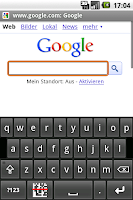
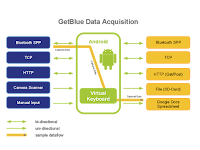
Bluetooth Data Acquisition on Android Currently TEC-IT offers two Android apps for data acquisition with Bluetooth devices: GetBlue provides universal data acquisition and device communication with Bluetooth SPP, TCP and camera scanners. GetBlue communicates with serial Bluetooth devices (Serial Port Profile like SPP/RFCOMM barcode readers), TCP/IP devices and camera scanners. Captured data is displayed, saved (File, Google Docs), forwarded (HTTP, TCP) or injected as virtual keystrokes into Apps (GetBlue virtual keyboard). BluePiano extends all Apps with automated Bluetooth data acquisition. This new input method provides a Bluetooth-enabled soft-keyboard . This virtual keyboard captures data from Bluetooth SPP devices (serial port profile) and forwards the received data to input fields of arbitrary apps. Microvision ROV Bluetooth Scanners Problem: Some users are experiencing the following issue: once a bar code is scanned with the Microvision ROV barcode scanner the bar code ...

BluePiano: A New Android Bluetooth Input Method

Image
BluePiano Bluetooth Input Method for Android The input method BluePiano extends Android with Bluetooth data acquisition . This new input method provides a Bluetooth-enabled soft-keyboard . This soft-keyboard captures Bluetooth data and forwards the received data to input fields of arbitrary apps. The data appears as entered by the user (watch the video on YouTube). BluePiano is typically used for barcode scanning with external Bluetooth barcode-scanners or for generic data acquisition tasks (e.g. to capture raw external GPS or medical device data). English, German, French, Russian and Swedish keyboard layouts are available. BluePiano is easy to use and provides you with connectivity feedback in the notification bar. For backup purposes BluePiano is also able to scan barcodes using camera barcode scanners (using the built-in or an external camera scanner app). BluePiano works with all Bluetooth SPP devices (Bluetooth devices supporting the Serial Port Profile, RFCOMM)....

Barcode Scanner Keyboard for Android

Image
Type Or Scan Barcode Keyboard NEW Barcode Keyboard Version 2.0 availab le ! Click Here To Learn More!

Android Bluetooth Reader, Keyboard Wedge

Image
In the past few months TEC-IT developed an  Android App for data acquisition with Bluetooth and TCP . The good feedback of the Android community motivated us to further enhance this app. The result: an universal data acquisition app including keyboard wedge functionality. The app is named GetBlue . The final version is available as slightly restricted freeware as well as commercial application. Here are the highlights: Android Keyboard Wedge / Virtual Keyboard : Captured device data can be entered into any application. Supported Input Devices :  Bluetooth SPP/RFCOMM, TCP (e.g. RFID controllers), HTTP applications and camera scanners apps like the ZXing Barcode Scanner. Supported Data-Sinks : Bluetooth SPP/RFCOMM, plain TCP, HTPP via Get and Post, Google Docs Spreadsheets, File. Data Acquisition Proxy  / Data Switchboard: Acquired data can be forwarded to any supported data-sink. Universal Data Acquisition App Use GetBlue like an universal data switchboa...

Automated Data Acquisition for Android - Update

TEC-IT ( http://www.tec-it.com ) published version 0.7 of the Android data acquisition app GetBlue ! GetBlue captures device data and saves this data directly to a local file, to a Google Spreadsheet  or forwards it to adjustable HTTP/TCP data logging servers. Bi-directional communication is supported, server responses as well as manually entered data can be sent to the connected device. Currently the following devices are supported: Any Bluetooth device supporting the Serial Port Profile (SPP, RFCOMM), Any TCP/IP device (IP-Address/Port combination),  And new in this version : any installed camera barcode scanner (e.g. the ZXing camera barcode scanner , cyrket market  information )  Currently GetBlue is available as freeware - the manual data acquisition functions are available unlimited. Automated data acquisition functionality (like uploading captured data to a TCP data logger) are slightly restricted. All data collection parameters are adjustabl...

New: Videos For Data Acquisition Software

TEC-IT announces the availability of the first product videos for the data acquisition software TWedge . What is TWedge? TWedge extends arbitrary databases and applications with flexible real-time data collection. Modifications of the target systems are not required! Use this software wedge with RS232, serial, Bluetooth, USB and TCP/IP interfaces. Captured data is forwarded immediately to databases, applications and ERP systems like SAP R/3. Choose between direct ODBC database access, file access or keystroke simulation (keyboard wedge). In the first video the usage of the software wedge TWedge is explained. The second video shows how to use the scripting features of TWedge. The scripting features enable you to modify the device data, to communicate with devices in a bi-directional way, to configure hot-key and timer-based functions and to perform basic user-interactions. More information about TEC-IT products you will find on our youtube channel TECITSoftware .

Serial (RS232), TCP/IP, USB and Bluetooth Software Wedge

The service release V2.4 of TWedge ( software wedge , keyboard wedge , Bluetooth wedge , TCP wedge ) is now available for download. In version 2.4 an issue with failed TCP/IP and Bluetooth connections was fixed. Check it out! Download Software Wedge .

TWedge V2.3 Release Candidate

Image
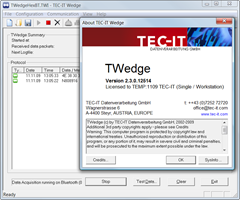
We are announcing the new version of the data acquisition software / software wedge TWedge. TWedge is smart middleware which connects to arbitrary devices via RS232 (COM port), Bluetooth (native!) and TCP/IP. The received data is either simulated as keystrokes , stored in a file or saved directly into an ODBC database . Improvements 0-byte awareness Previous versions clipped received or transmitted data after an 0x00 in the data stream. HEX data display Incoming data can be displayed as HEX string for better debugging Silent mode Device data display can now be turned off Release Candidate Download Download data acquisition software TWedge (MSI setup file for Windows).  Technorati Tags: Database Wedge , software wedge , keyboard wedge , daq , aidc , barcode wedge , BlueTooth Wedge , Data Collection Software , Data Capture Software , TWedge , TEC-IT

Reading RFID Tags with TWedge

Image
TEC-IT's data acquisition software TWedge allows an easy implementation of RFID controller protocols. TWedge can be adjusted to communicate with RFID controllers in a bi-directional way. Reading and processing tag identifiers is as easy as reading/writing tag data! The following TWedge script can be used to read RFID Tag IDs from EMS Datalogic RFID Controllers (utilizing the ABx Fast Protocol). The following script performs the following functions: 1) Query the RFID controller by pressing the hotkey 2) When data is received test it for a valid response 3) Display data in MessageBox Try it yourself - Download the software wedge for free ! Keep in mind: V2.3 or higher is required! Global Helper Functions HEX Conversion function encodeHex(input) { hexOutput = ""; for (i=0; i hexOutput = hexOutput + ' ' + Dec2Hex(input.charCodeAt(i)); } return hexOutput; } function encodeDec(input) { decOutput = ""; for (i=0; i decO...

TWedge Hotfix

This hotfix solves a problem when saving the settings of the software wedge into a TWI file. The format of the TWI files was changed. This ensures that the settings can be saved even if special characters (like STX, ETX, EOT, DC1, DC2, ...) are part of the script. TWI files from previous version can be loaded without problems! Download the hotfix here: Software Wedge for Windows

Software Wedge: TWedge V2.1 RC

Image
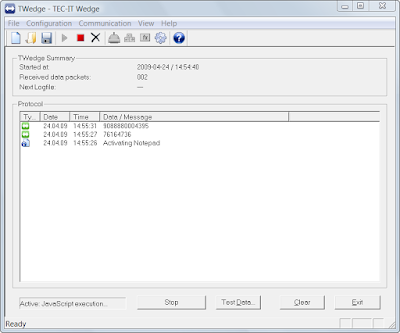
Based on user-feedback a new service release of the data acquisition software TWedge is announced. TWedge V2.1 installs and runs on all current Windows-based operating systems (32 bit and 64 bit). V2.1 introduces: User Input Functionality: The new function 'InputBox' allows a user to enter data in real-time (validation is optional). Clipboard Access Functions: The clipboard functions "CopyToClipboard" and "GetFromClipboard" were introduced. These functions are useful for larger amounts of data, where a simulation of keystrokes is not feasible or too slow. Multiple Control Strings: Now it is possible to send a combination of key constants and modifier keys using the '+' character' (e.g.: "{CTRL+f}" or "{CTRL+SHIFT+h}"). Multiple modifier keys can be now processed through multiple control string. Improved User Interface (GUI): Toolbar and application icons were redesigned. TWedge V2.1 was released on 04-29-2009. More detail...

Data Acquisition Software TWedge 2.0 Released

Image
Merry Christmas! It's Christmas. In Austria that usually includes snow, silence (for some people), last-minute gift-shopping (for most people) and holidays. For TEC-IT customers this also means that the new version of the data acquisition software TWedge was released to the public. New and Flexible Data Acquisition Software TWedge version 2.0 captures data from serial, USB, Bluetooth or TCP/IP based devices and forwards this data to arbitrary applications or databases. The highlight of TWedge is the embedded scripting language (based on JavaScript). Using this scripting language any user can embed custom logic or data acquisition functions. It is very easy to extend the functionality of this software wedge, even direct database access functions (via ODBC) and file access methods are available. Downloads Check out the demo version: scriptable data acquisition software Press release: Universal Data-Acquisition Software Example (Simple) After adjusting the interface for data acquisi...

Software Wedge - Data Acquisition Software

Beside barcode, labeling and reporting software TEC-IT offers software tools for data acquisition . One of these tools is named TWedge - a software wedge. The main purpose of such a software wedge (also named keyboard wedge ) is to transform data read from an external device (connected via RS232, RS485, serial, COM, USB, Bluetooth or TCP/IP) into keyboard strokes. These keyboard strokes are then be forwarded to arbitrary applications. Using such middleware it is possible to automate data acquisition tasks - even with software applications which are not able to communicate with devices directly (e.g. like using a serial barcode scanner with Microsoft Excel). The existing version of TWedge fulfills its main purpose perfectly. Serial data is captured and forwarded to applications. But customers often require powerful possibilities for adjusting and modifying data prior it is forwarded to a target application. The solution to this problem? Scripting! The new version of TWedge supports J...