Posts

Showing posts with the label Serial

Your TEC-IT License, Serial or Activation Key Isn't Working?

Image
Experiencing trouble licensing TEC-IT software after reinstalling or migrating the product? Read on! Here is a step-by-step guide to help you solve this issue on your own. Self-Service License Key Management  This post shows you how to use the self-service license key/activation key management online service for the following TEC-IT software products: Barcode Studio ( https://tec-it.com/bcs ) TFORMer ( https://tec-it.com/tfd ) TWedge ( https://tec-it.com/twedge ) TBarCode Office ( https://tec-it.com/tbo ) Visit https://license.tec-it.com to recover, reactivate, reset or migrate activation keys for the above-mentioned TEC-IT software. This is especially helpful when moving licenses between computers, if you need to reactivate a product after reinstallation, or if the system ID of your computer changed after performing a factory reset or installing a new hard disk. The process is simple and usually completed within minutes, help by TEC-IT staff is not required . How to Use Enter t...
Mobile Data Acquisition Software Update: TWedgeCE V2.1.0

As from today an service update of our Mobile Data Acquisition Software (Mobile Software Wedge) TWedge V2.1.0 is available for download. New in TWedgeCE V2.1.0 Hot key support TWedgeCE now supports hot keys. Automatic screen orientation Depending on the screen orientation (portrait or landscape) TWedgeCE will automatically switch to the correct dialog layout. Download TWedgeCE V2.1.0 Update Juniper Systems adds TWedgeCE to its reference list of wedge software.

New: Videos For Data Acquisition Software

TEC-IT announces the availability of the first product videos for the data acquisition software TWedge . What is TWedge? TWedge extends arbitrary databases and applications with flexible real-time data collection. Modifications of the target systems are not required! Use this software wedge with RS232, serial, Bluetooth, USB and TCP/IP interfaces. Captured data is forwarded immediately to databases, applications and ERP systems like SAP R/3. Choose between direct ODBC database access, file access or keystroke simulation (keyboard wedge). In the first video the usage of the software wedge TWedge is explained. The second video shows how to use the scripting features of TWedge. The scripting features enable you to modify the device data, to communicate with devices in a bi-directional way, to configure hot-key and timer-based functions and to perform basic user-interactions. More information about TEC-IT products you will find on our youtube channel TECITSoftware .

Serial (RS232), TCP/IP, USB and Bluetooth Software Wedge

The service release V2.4 of TWedge ( software wedge , keyboard wedge , Bluetooth wedge , TCP wedge ) is now available for download. In version 2.4 an issue with failed TCP/IP and Bluetooth connections was fixed. Check it out! Download Software Wedge .

TWedge V2.3 Release Candidate

Image
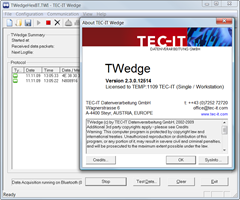
We are announcing the new version of the data acquisition software / software wedge TWedge. TWedge is smart middleware which connects to arbitrary devices via RS232 (COM port), Bluetooth (native!) and TCP/IP. The received data is either simulated as keystrokes , stored in a file or saved directly into an ODBC database . Improvements 0-byte awareness Previous versions clipped received or transmitted data after an 0x00 in the data stream. HEX data display Incoming data can be displayed as HEX string for better debugging Silent mode Device data display can now be turned off Release Candidate Download Download data acquisition software TWedge (MSI setup file for Windows).  Technorati Tags: Database Wedge , software wedge , keyboard wedge , daq , aidc , barcode wedge , BlueTooth Wedge , Data Collection Software , Data Capture Software , TWedge , TEC-IT

Scan & Store: Scan Barcodes directly into any Database

Image
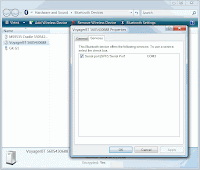
Are you looking for a basic inventory solution or you are just interested in registering items based on their barcode? The data acquisition software TWedge provides an elegant solution - TWedge captures data from arbitrary devices (like a serial or USB barcode scanner) and can be configured to store captured data directly into any ODBC database. Additional database software is NOT required!   Smart Software Wedge Configuration of TWedge is extremely flexible: The data acquisition functionality can be configured to meet your exact requirements. TWedge is able to perform read/write access to files, databases and may also simulate keystrokes. To implement the required functionality you need: A serial (or USB) barcode scanner. The used COM port as well as the interface parameters are important (most likely it will be 9600,N,8,1 - meaning 9600 bits per second, no parity, 8 data bits, 1 stop bit) TWedge ( download ) Determine Bluetooth COM Port For this example I use...

Barcode and RFID Wedge / Software Wedge: TWedge V2.1

As of today TEC-IT released a new version of the data acquisition software TWedge. TWedge is a smart data collection tool which is in use as barcode wedge, software wedge, keyboard wedge, serial wedge, scale wedge, etc. Just choose the name you prefer :-). V2.1 introduces: User Input Functionality: The new function 'InputBox' allows a user to enter data in real-time (validation is optional). Clipboard Access Functions: The clipboard functions "CopyToClipboard" and "GetFromClipboard" were introduced. These functions are useful for larger amounts of data, where a simulation of keystrokes is not feasible or too slow. Multiple Control Strings: Now it is possible to send a combination of key constants and modifier keys using the '+' character' (e.g.: "{CTRL+f}" or "{CTRL+SHIFT+h}"). Multiple modifier keys can be now processed through multiple control string. Improved User Interface (GUI): Toolbar and application icons were re...

Software Wedge - Data Acquisition Software

Beside barcode, labeling and reporting software TEC-IT offers software tools for data acquisition . One of these tools is named TWedge - a software wedge. The main purpose of such a software wedge (also named keyboard wedge ) is to transform data read from an external device (connected via RS232, RS485, serial, COM, USB, Bluetooth or TCP/IP) into keyboard strokes. These keyboard strokes are then be forwarded to arbitrary applications. Using such middleware it is possible to automate data acquisition tasks - even with software applications which are not able to communicate with devices directly (e.g. like using a serial barcode scanner with Microsoft Excel). The existing version of TWedge fulfills its main purpose perfectly. Serial data is captured and forwarded to applications. But customers often require powerful possibilities for adjusting and modifying data prior it is forwarded to a target application. The solution to this problem? Scripting! The new version of TWedge supports J...