Posts

Showing posts with the label Apps

Improved: Mobile Data Collection with Cloud Connectivity
Image
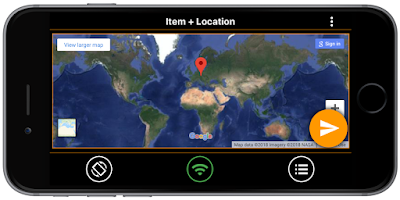
Scan-IT to Office   is an efficient solution for  mobile data acquisition with real-time cloud connectivity  to Microsoft ®  Excel ® , Microsoft ®  Word and Google Sheets. With this mobile app you   capture barcodes, texts, numbers, locations or images  with any Android or iOS device. Cloud services deliver the collected data immediately to documents on your desktop computer. The latest versions of Scan-IT to Office now includes the following enhancements: Scan-IT to Office V3.3.1 (iOS) Improved User Interface The app provides a redesigned toolbar for better usability Improved Form Editor Form fields now have the option to remember the last entered value Simplified Pairing For New Users   The pairing wizard opens automatically when starting the app for the first time Scan-IT to Office V3.2.0 (Android) New Input Form Field Type Added  Location  as new field type for input forms Android 4 Support Input forms are now compatibl...

Scan-IT to Office: New App Scans Barcodes Directly Into Microsoft Office

Image
Use your smartphone to scan barcodes directly into Microsoft Word and Excel documents. Smart cloud services transfer the data immediately to a document of your choice.  This works globally and regardless of your location, single and multiple user scenarios are supported. Video is coming soon. Contact us  for further information or v isit our website !

How to use Microvision ROV Barcode Scanners with Android - Update!

Image
Bluetooth Data Acquisition on Android Currently TEC-IT offers two Android apps for data acquisition with Bluetooth devices: GetBlue provides universal data acquisition and device communication with Bluetooth SPP, TCP and camera scanners. GetBlue communicates with serial Bluetooth devices (Serial Port Profile like SPP/RFCOMM barcode readers), TCP/IP devices and camera scanners. Captured data is displayed, saved (File, Google Docs), forwarded (HTTP, TCP) or injected as virtual keystrokes into Apps (GetBlue virtual keyboard). BluePiano extends all Apps with automated Bluetooth data acquisition. This new input method provides a Bluetooth-enabled soft-keyboard . This virtual keyboard captures data from Bluetooth SPP devices (serial port profile) and forwards the received data to input fields of arbitrary apps. Microvision ROV Bluetooth Scanners Problem: Some users are experiencing the following issue: once a bar code is scanned with the Microvision ROV barcode scanner the bar code ...

GetBlue Bluetooth SPP Problems: Android Troubleshooting

Bluetooth SPP Data Acquisition GetBlue is an Android App which captures data from a data-source ( Bluetooth SPP, TCP and Camera Scanners ) and forwards the collected data to an adjustable data-sink (TCP, HTTP, File, Display, Online Spreadheets provided by Google Docs, GetBlue virtual keyboard). Data collection is done completely in the background. Bluetooth SPP Connection Problems Recently some users reported problems when using Bluetooth SPP (Serial Port Profile) devices with GetBlue: A Bluetooth SPP device can be paired without problems but GetBlue is unable to connect to it. A Possible Solution In order to avoid the connection problems please do the following in EXACTLY the given order : a) Disable all GetBlue functions: Set datasink to "None", do NOT use keyboard output and deactivate the GetBlue keyboard in Android settings (required only if previously enabled). b) Reboot the phone c) Enable Bluetooth d) Pair the Bluetooth device with your handset (Android set...

Barcode Scanner Keyboard for Android

Image
Type Or Scan Barcode Keyboard NEW Barcode Keyboard Version 2.0 availab le ! Click Here To Learn More!