Posts

Showing posts with the label Serial Wedge

Data Collection Software "Nifty as Never Before"

Image
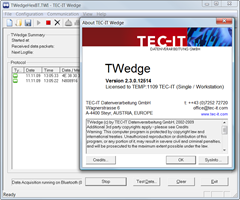
TWedge Redefines Flexibility  +TEC-IT   proudly introduces the smart data collection software   TWedge Version 3 . RELEASED as of May 22, 2014!! TWedge is more than just a keyboard wedge - this software tool makes automated data acquisition with serial ports (RS232, RS485 and virtual COM ports), Bluetooth ® , TCP, UDP and USB HID devices extremely easy. The collected data can be stored directly in files or databases, forwarded to target applications via keystroke simulation (keyboard wedge), entered into spreadsheets like Microsoft Excel, sent to web-services, and so on. It is even possible to use TWedge as protocol converter and convert data between interfaces (e.g., COM to TCP). All aspects of the data acquisition logic can be configured with the integrated scripting capabilities. The new version was rewritten from scratch and offers unmatched possibilities, advantages and capabilities. To put it simply: With TWedge V3, data acquisition has become "Nifty as Ne...

New Mobile Data Acquisition Software from TEC-IT

Image
Press Release TEC-IT Datenverarbeitung GmbH ( www.tec-it.com ) released the new version of its data acquisition software for mobile devices . The new release of TWedgeCE simplifies mobile data acquisition significantly. This software wedge provides application-independent data collection and data logging features for mobile devices. Once installed and configured, TWedgeCE captures data from arbitrary devices like bar code scanners, readers, RF-ID transponders and ID tags, electronic meters and sensors, balances, scales, weights, gauges and many more. TWedgeCE forwards the captured device data automatically to target applications by simulating keystrokes . This mobile software wedge extends standard applications like Office Mobile, browser based front-ends and any other system with flexible and affordable data acquisition functionality. There is no need to modify the target applications. Guenter Kriegl, the CEO of TEC-IT, emphasizes the strengths of TWedgeCE: „The new release ...

New: Videos For Data Acquisition Software

TEC-IT announces the availability of the first product videos for the data acquisition software TWedge . What is TWedge? TWedge extends arbitrary databases and applications with flexible real-time data collection. Modifications of the target systems are not required! Use this software wedge with RS232, serial, Bluetooth, USB and TCP/IP interfaces. Captured data is forwarded immediately to databases, applications and ERP systems like SAP R/3. Choose between direct ODBC database access, file access or keystroke simulation (keyboard wedge). In the first video the usage of the software wedge TWedge is explained. The second video shows how to use the scripting features of TWedge. The scripting features enable you to modify the device data, to communicate with devices in a bi-directional way, to configure hot-key and timer-based functions and to perform basic user-interactions. More information about TEC-IT products you will find on our youtube channel TECITSoftware .

Serial (RS232), TCP/IP, USB and Bluetooth Software Wedge

The service release V2.4 of TWedge ( software wedge , keyboard wedge , Bluetooth wedge , TCP wedge ) is now available for download. In version 2.4 an issue with failed TCP/IP and Bluetooth connections was fixed. Check it out! Download Software Wedge .

Software for Mobile Data Acquisition

Image
TEC-IT released the new version of TWedgeCE - a software wedge for mobile devices . What is TWedgeCE? TWedgeCE captures data from external devices and translates them into virtual keystrokes. It acts as middleware between arbitrary data acquisition devices (like scales, gauges, barcode scanners, RFID controllers, etc.) and software applications like Pocket Excel or Mobile Internet Explorer. TWedgeCE operates in the background of the mobile device and can be configured easily via simple configuration files. Highlights: Version 2.0 is able to work with devices via the following interfaces: Serial / RS232 Bluetooth (native Bluetooth, no virtual COM ports required!) TCP/IP (client mode) TCP(IP (server mode) UDP (client mode) TWedgeCE is able to check device connectivity (I-Am-Alive), it recovers lost connections automatically (this is especially of interest for WLAN or Bluetooth connections) and finally introduces an anti-jitter feature. Availability: The mobile software wedge is available...

TWedge V2.3 Release Candidate

Image
We are announcing the new version of the data acquisition software / software wedge TWedge. TWedge is smart middleware which connects to arbitrary devices via RS232 (COM port), Bluetooth (native!) and TCP/IP. The received data is either simulated as keystrokes , stored in a file or saved directly into an ODBC database . Improvements 0-byte awareness Previous versions clipped received or transmitted data after an 0x00 in the data stream. HEX data display Incoming data can be displayed as HEX string for better debugging Silent mode Device data display can now be turned off Release Candidate Download Download data acquisition software TWedge (MSI setup file for Windows).  Technorati Tags: Database Wedge , software wedge , keyboard wedge , daq , aidc , barcode wedge , BlueTooth Wedge , Data Collection Software , Data Capture Software , TWedge , TEC-IT

How to Suppress Duplicate Barcodes or RFID Tags with the Software Wedge?

Image
The Problem: Maybe you are familiar with this scenario: You are connecting a barcode scanner, an electronic scale or an RFID reader to your computer. When capturing data it turns out that the device is sending identical values multiple times . This happens if the user scans a barcode repeatedly, a scale sends the weight of the item periodically or if a RFID reader reports the value of a RFID tag at regular intervals. The Solution: TWedge provides a very flexible and elegant solution to this problem. The software wedge can be customized to suppress multiple, identical values easily: Just save the last data value received from the device and compare it with the current one. Forward the device data to target application only if these values are not identical. Here is the script: The Software Wedge Script: OnStart() is the perfect place to initialize the last received data value ( sLastData ) with a null value. OnStart is executed when device communication is initialized (e.g. the seria...

TWedge Hotfix

This hotfix solves a problem when saving the settings of the software wedge into a TWI file. The format of the TWI files was changed. This ensures that the settings can be saved even if special characters (like STX, ETX, EOT, DC1, DC2, ...) are part of the script. TWI files from previous version can be loaded without problems! Download the hotfix here: Software Wedge for Windows

Scan & Store: Scan Barcodes directly into any Database

Image
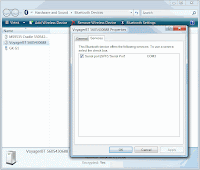
Are you looking for a basic inventory solution or you are just interested in registering items based on their barcode? The data acquisition software TWedge provides an elegant solution - TWedge captures data from arbitrary devices (like a serial or USB barcode scanner) and can be configured to store captured data directly into any ODBC database. Additional database software is NOT required!   Smart Software Wedge Configuration of TWedge is extremely flexible: The data acquisition functionality can be configured to meet your exact requirements. TWedge is able to perform read/write access to files, databases and may also simulate keystrokes. To implement the required functionality you need: A serial (or USB) barcode scanner. The used COM port as well as the interface parameters are important (most likely it will be 9600,N,8,1 - meaning 9600 bits per second, no parity, 8 data bits, 1 stop bit) TWedge ( download ) Determine Bluetooth COM Port For this example I use...

Barcode and RFID Wedge / Software Wedge: TWedge V2.1

As of today TEC-IT released a new version of the data acquisition software TWedge. TWedge is a smart data collection tool which is in use as barcode wedge, software wedge, keyboard wedge, serial wedge, scale wedge, etc. Just choose the name you prefer :-). V2.1 introduces: User Input Functionality: The new function 'InputBox' allows a user to enter data in real-time (validation is optional). Clipboard Access Functions: The clipboard functions "CopyToClipboard" and "GetFromClipboard" were introduced. These functions are useful for larger amounts of data, where a simulation of keystrokes is not feasible or too slow. Multiple Control Strings: Now it is possible to send a combination of key constants and modifier keys using the '+' character' (e.g.: "{CTRL+f}" or "{CTRL+SHIFT+h}"). Multiple modifier keys can be now processed through multiple control string. Improved User Interface (GUI): Toolbar and application icons were re...